
Earthquake Network
Futura Innovation SRLCommunication
4.22.81K Reviews
- Version
- 26.7.23
- Installs
- 10.00M
- Age Rating
- Everyone
Screenshots
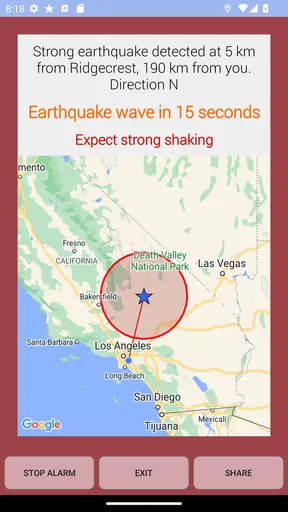
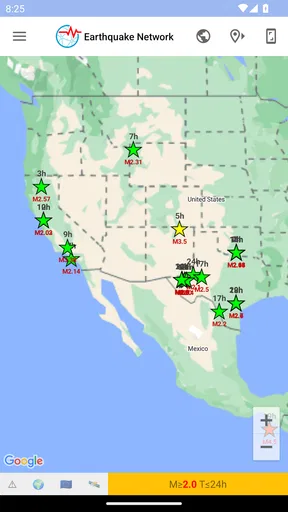
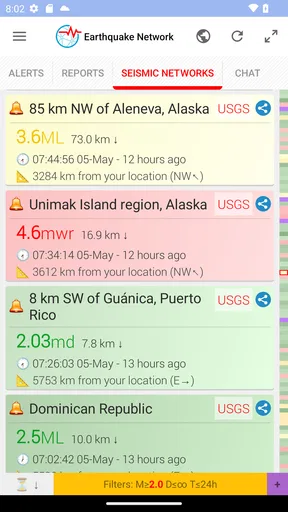
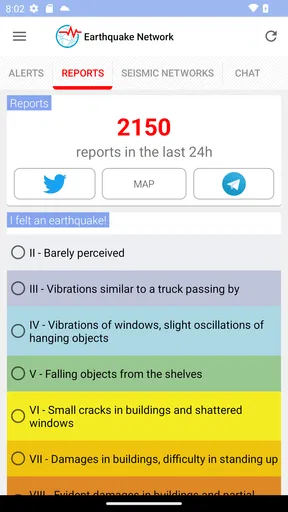
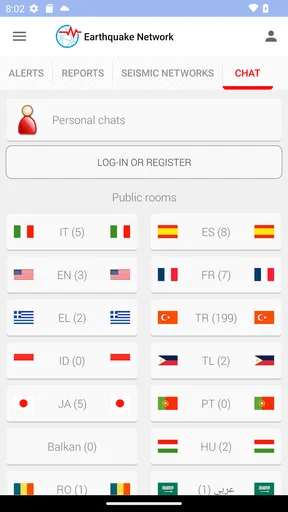
Our Review of Earthquake Network
 Analysis by Appyee
I look at earthquake tools differently from ordinary communication apps. The important question is not whether the interface feels exciting, but whether I can understand an alert quickly when I am tired, distracted, or already worried. Earthquake Network is built around that urgent use case: it brings real-time earthquake alerts to a smartphone and places them inside a communication app that can also help users follow seismic activity. After spending time with it, I see a useful idea with a practical purpose, although it is not a replacement for official emergency guidance or a guarantee that every warning will arrive before shaking begins.
Developed by Futura Innovation SRL, this free app belongs to the communication category and is suitable for Everyone. It has been available since December 19, 2012, and its current version is 26.7.23. Its long presence and broad adoption are reflected in an average rating of 4.2 from around 174 thousand ratings, with more than 10 million installs. That makes it an established choice rather than a niche experiment, but popularity alone does not decide whether it fits a particular person’s needs.
Using Earthquake Network when attention, movement, or time is limited
I find Earthquake Network most useful when I plan around the moments I cannot keep checking my phone: while cooking, walking, or focusing on work. This section looks at how to make an alert easier to notice without turning the app into another screen that demands constant attention, then considers what keeps that routine worthwhile over time.
Readability and navigation in a stressful moment
The strongest part of this app’s concept is its directness. An earthquake alert is useful only if I can recognize what is happening without working through a complicated sequence of screens. The app’s purpose is immediately understandable: it focuses my attention on seismic events instead of surrounding the warning with unrelated social features, entertainment, or a large collection of communication tools.
That focus matters for people who have difficulty processing dense information. Someone with dyslexia, limited concentration, anxiety, or reduced short-term memory may benefit from an app that supports one clear task. In practice, I would keep it in an obvious place on the phone and spend time exploring its screens during a calm period, rather than trying to learn the layout in the middle of an emergency.
There is also a useful distinction between an alert and an explanation. A short warning can be easier to act on, while maps, event details, and activity information are better suited to checking what happened afterward. I would not expect every screen to serve both purposes equally well. If I am already feeling shaking, I need a simple path to understanding the warning. If I am reviewing an event later, I can afford more detail and slower reading.
Users with low vision should check how the app’s text, icons, contrast, and map elements appear on their own device. Android display scaling and system accessibility settings may improve readability, but the result can vary with the phone and operating system. I would especially avoid assuming that a map is automatically accessible just because its labels are visible. Maps often require visual comparison, pinching, and interpretation of small symbols, which can be tiring for anyone with limited sight.
Navigation can also become harder when a person uses a screen reader or enlarged text. A layout that looks clean at standard size may become crowded when text is enlarged. The sensible approach is to open the app with the phone’s preferred accessibility settings already enabled, move through the main areas, and confirm that important information is announced in a useful order. That small test is more reliable than judging accessibility from screenshots or the app’s category alone.
Motor and sensory considerations
Earthquake Network is most valuable when it reduces the need for repeated interaction. A person with tremors, limited dexterity, joint pain, or one-handed use may struggle with small map controls and precise taps. For that reason, I would treat the app as an alert companion rather than something to operate continuously. The less I need to touch the screen during an event, the better the experience is likely to be.
People who are sensitive to sound should think carefully about how an alert fits into their normal phone setup. A sound can be helpful for someone who is asleep or not looking at the display, but it can also be startling for users with sensory sensitivities, post-traumatic stress, or hearing-related needs. I would test the alert behavior in a safe setting and decide whether vibration, visual attention, or another personal routine is the most comfortable way to notice it.
That choice is particularly important for deaf or hard-of-hearing users. A sound-only signal is not enough for reliable access, so visual and vibration cues deserve attention during setup and everyday use. I would not rely on a phone placed face down, hidden in a bag, or left in another room. The app can only help if the device is close enough and configured in a way the user can actually perceive.
For blind users, the most important question is whether the alert message and essential event information are announced clearly by the phone’s assistive technology. A map-based experience may be less useful than concise text. If the app communicates the key warning through readable labels, it can still have a role, but I would pair it with an established emergency plan that does not depend on interpreting a visual map.
One practical tip is to prepare a low-effort routine before needing the app. Keep the phone charged, place it where alerts can be noticed, and make sure the device is not buried under clothing or cushions at night. This is not a special feature of the application, but it changes its usefulness more than constantly checking the screen. An alert system is only as accessible as the complete chain from notification to human action.
Situational access at home, outdoors, and while traveling
The app makes the most sense for people who want an additional source of earthquake awareness while living, working, or traveling in areas where seismic activity is a concern. A traveler might use it to become familiar with local activity, while a household could keep it available as one part of a broader preparedness plan. In both cases, I would treat it as information support rather than an instruction to wait for a phone notification before taking safety action.
Consider a realistic evening at home. I am cooking, my phone is on a nearby counter, and an alert appears while I am not actively using the device. The value comes from noticing it quickly, understanding that it concerns an earthquake, and moving into the safety response I have already discussed with the people around me. The app is not the plan; it is one signal that may help me recognize a developing situation.
That distinction becomes even more important in a workplace, school, hotel, or shared home. A person may not control the building’s alarms, network conditions, or phone placement. Someone with mobility limitations may need more time to move safely, while a person with cognitive disabilities may benefit from a rehearsed, plain-language response. In those situations, the app can support awareness, but another person, a building procedure, or an official warning channel may be more dependable for coordinated action.
Travel introduces another trade-off. I may appreciate having earthquake information on my own phone, but unfamiliar language, local emergency practices, roaming conditions, and weak connectivity can all complicate the experience. I would set up the app before a trip, learn how its notices look, and identify local official sources separately. Relying on one application while abroad would be an avoidable mistake.
For users who cannot hear a phone in a noisy environment, visual checking becomes more important. For users who cannot see the screen easily, a nearby trusted person or an accessible secondary method may be necessary. Someone with limited hand movement may want to avoid placing the phone in a location that requires reaching quickly. These are small environmental decisions, but they determine whether the app works for the person using it.
Compared with ordinary weather apps, messaging services, or general news notifications, Earthquake Network has a narrower purpose. That specialization can make it easier to associate the app with seismic alerts, while a general-purpose service may bury an earthquake notice among many other updates. On the other hand, official emergency channels remain important because they are designed for public safety instructions, evacuation information, and local authority communication. I would use this app alongside those channels, not instead of them.
What still creates friction
The first limitation is unavoidable: no smartphone alert can promise perfect timing or universal coverage. An alert may arrive after shaking has started, or circumstances may prevent a person from seeing or hearing it. Network availability, phone settings, battery level, location, and the nature of an earthquake all affect the real-world result. Anyone who needs immediate protection should follow established earthquake safety guidance rather than waiting for an app.
Another barrier is the emotional pressure attached to the subject. Repeatedly checking seismic information can reassure one user and increase anxiety in another. I would avoid turning the application into a constant-monitoring habit. A calmer workflow is to configure it, understand the notification style, and then let the phone do its limited job while I focus on ordinary life.
There may also be a learning curve for people who are not comfortable with maps, event terminology, or location-based information. A family member or support worker can help by explaining the screens in plain language and writing a short personal action plan elsewhere. That is especially useful for older adults, people with cognitive disabilities, and users who become overwhelmed by changing visual information.
Cost is straightforward at the basic level because the app is free, but in-app purchases range from $0.69 to $23.99 per item. I would not assume that paying is necessary for the core experience, nor would I buy anything before understanding exactly what an optional purchase changes. For a household managing a tight budget, the free availability makes testing easier, but purchase prompts can still be a source of friction for users who need a very simple interface.
The minimum operating system is Android 6.0, which keeps the app available to many older devices. That is helpful for people who cannot replace a phone frequently. At the same time, an older device may have a weaker battery, slower performance, or less reliable notification behavior than a newer one. Accessibility is therefore partly a device issue: a capable app cannot compensate for a phone that is routinely powered off, overloaded, or kept far from its owner.
Privacy and comfort also deserve a personal check whenever an app uses location or notification-related functions. I would review the phone’s permission controls and notification settings in language I understand, then disable anything that is not needed for my intended use. I would also make sure that sensitive alert content is not exposed on a lock screen if other people regularly see the phone. These steps are especially relevant in shared living arrangements or workplaces.
Who will benefit, and who should choose another approach?
I think Earthquake Network is a good fit for someone who wants a dedicated earthquake-awareness tool, prefers a focused communication app over a broad news feed, and is willing to prepare the phone before an emergency. It can also suit families that want a common source of awareness, provided everyone understands that the app does not replace a household plan.
It is less suitable as the only safety resource for people who need guaranteed official instructions, continuous human support, or highly specialized accessibility features. Someone who cannot reliably perceive phone notifications should not depend on it alone. A user who finds earthquake alerts psychologically distressing may also prefer a quieter official channel or a trusted person who filters urgent information.
My practical recommendation is to test the complete workflow, not just install the app. Check whether the text is readable, whether the alert can be perceived in the home’s noisiest and quietest places, whether enlarged display settings cause problems, and whether a trusted person can understand the same notification. Then write down what to do after an alert. This reveals barriers that a high rating or a polished store page cannot reveal.
In the end, I see Earthquake Network as a useful extra layer rather than a complete emergency system. Its focused purpose, free entry point, and established presence make it worth considering for earthquake awareness. Its value is highest when the user adapts the phone to their own vision, hearing, movement, attention, and environment. The most inclusive way to use it is to combine the app with official warnings, a practiced safety plan, and a backup person or method when the phone is not enough.
For me, that balanced role is the reason to recommend it. I would install Earthquake Network if I wanted a dedicated way to stay informed, but I would not confuse an alert with protection itself. Used thoughtfully, it can improve awareness without demanding constant screen time. Used alone, especially by someone facing sensory, motor, or communication barriers, it leaves too much responsibility on a single device.
Verdict
Strengths of Earthquake Network
- Provides fast alerts based on nearby smartphone-detected earthquakes.
- Can show reports from users in affected areas.
- Useful worldwide, including regions with limited official warning systems.
- Offers map-based views to understand earthquake locations and intensity.
- May help users prepare before stronger shaking reaches their area.
Limitations of Earthquake Network
- Alerts depend on nearby users and may be unavailable in sparsely populated areas.
- Detection and notifications can occasionally be delayed or inaccurate.
- Continuous location and sensor access may affect battery life and privacy.
- Some features or alert options may require in-app purchases.
- It is not a replacement for official emergency warnings or safety guidance.
Similar Picks in This Category
View All
Google Messages
Google LLC4.6

Gmail
Google LLC4.1

Google Meet
Google LLC4.4

Google Chrome
Google LLC4.1

WhatsApp Messenger
WhatsApp LLC4.6

Carrier Services
Google LLC4.2
Frequently Asked Questions
What is Earthquake Network and how does it work?
Earthquake Network is a smartphone-based earthquake alert and reporting app that uses your device’s motion sensors, together with data from official seismic networks and reports from users, to provide information about nearby earthquakes. When the system detects unusual shaking, it can send an alert and display details such as the estimated location, magnitude, and distance. Results may vary depending on your phone, network connection, and regional coverage.
Can Earthquake Network warn me before an earthquake happens?
The app may provide a few seconds of warning when an earthquake has already started somewhere nearby but its strongest waves have not yet reached your location. This is not a guaranteed prediction system, and it cannot forecast earthquakes in advance. Alert speed and availability depend on sensor detections, internet connectivity, server processing, distance from the epicenter, and whether the affected area is covered by the app or compatible seismic networks.
Does Earthquake Network work without an internet connection?
An active internet connection is generally needed to receive real-time earthquake alerts, send sensor information, synchronize reports, and view updated event data. If your phone is offline, has weak mobile coverage, or restricts background data, notifications may be delayed or unavailable. Some previously downloaded information may remain visible, but the app should not be treated as a fully offline emergency warning tool.
Does the app drain battery or use my phone’s sensors continuously?
Earthquake Network can use your phone’s accelerometer and background services to detect possible seismic movement, so battery consumption may be higher than with a simple information app. The actual impact depends on your device, operating-system settings, signal strength, and how frequently the app runs in the background. Battery optimization, restricted background activity, or force-closing the app may reduce its ability to detect or deliver alerts.
Is Earthquake Network reliable enough to replace official emergency warnings?
Earthquake Network can be a useful additional source of information, but it should not replace official alerts, emergency authorities, or established safety procedures. Detection may produce false alarms, miss some events, or arrive after shaking has begun. Users should keep government emergency notifications enabled, follow local earthquake guidance, and prepare an emergency plan. Never delay protective action while waiting for confirmation from the app.
